Mastering Visual Communication with Tehsoe Google Slide Templates
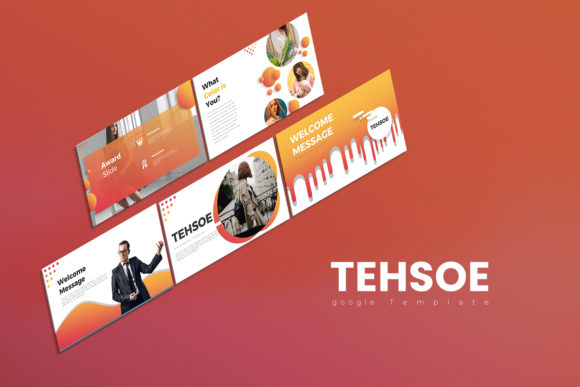
In the digital age, the ability to present ideas clearly and aesthetically is not just a skill—it is a necessity. Whether you are a designer pitching a concept, an entrepreneur seeking funding, or a marketer presenting quarterly results, the visual medium through which you speak is just as important as the content itself. This is where the Tehsoe Google Slide Templates step in, offering a bridge between professional corporate necessity and creative artistic expression. It is more than just a collection of slides; it is a comprehensive design system built to impress.
A Balance of Clean Aesthetics and Corporate Flexibility
The core personality of the Tehsoe Google Slide Templates lies in its duality. Often, designers struggle to find assets that are "clean" enough for a boardroom but "creative" enough to capture attention. This template solves that problem by utilizing a modern typography approach that favors whitespace, scalability, and structure. The visual style is distinctly minimalistic yet sophisticated. It avoids the clutter that plagues many standard presentations, opting instead for a layout that guides the viewer's eye naturally through the information.
What makes this particular design asset stand out is its adaptability. The package includes 30 unique slides (60 total, accounting for white and dark background versions). This dual-background feature is a strategic advantage. For instance, a tech startup might prefer the sleek, high-contrast dark version to convey innovation, while a legal consultancy might opt for the crisp white version to emphasize transparency and professionalism. The 16:9 aspect ratio ensures that your work looks native on modern screens, from laptops to large conference projectors, eliminating those awkward black bars that can make a presentation feel amateurish.
Practical Applications: From Brand Strategy to Pitch Decks
Understanding where the Tehsoe Google Slide Templates fit into your workflow is essential for maximizing their value. This is not a static file to be used once and forgotten; it is a versatile tool for various scenarios.
For entrepreneurs and small business owners, the template serves as the backbone for pitch decks. The included vector icons and editable charts allow you to present complex data—such as growth projections or market analysis—in a digestible, visual format. Because the charts are editable in Excel, you can update your numbers in real-time without worrying about breaking the design integrity of the slide.
For marketers and content creators, the Tehsoe template is ideal for webinars and educational content. The layout options support a strong visual hierarchy, ensuring that your key takeaways are highlighted effectively. You can use the image placeholders to seamlessly integrate high-quality stock photos or your own branded photography, creating a cohesive narrative that keeps your audience engaged.
Graphic designers and agencies will find the template particularly useful for client presentations. Instead of starting from scratch every time a client requests a revision, the modular design allows you to mix and match slides. This efficiency is crucial in a fast-paced environment. The clean lines and modern structure help position your agency as organized and detail-oriented—qualities that clients value highly.
Customization: Making the Template Your Own
One of the most significant pain points with presentation templates is rigidity. Many look great in the preview but fall apart when you try to edit them. The Tehsoe Google Slide Templates are designed with "editability" as a priority. Every element is fully customizable, from colors to shapes to text blocks.
To get the most out of this template, consider the following practical steps:
- Font Integration: The package relies on free fonts. Before you begin, ensure you have installed the recommended typeface. Typography is the voice of your presentation; using the intended font maintains the intended kerning and spacing that the designer carefully calibrated.
- Color Schemes: While the template comes with a standard color scheme, it is easily adaptable. If you are working on a brand identity project, update the master slides with your client’s hex codes. This ensures consistency across the entire deck and reinforces brand recognition.
- Visual Hierarchy: Pay attention to the slide layouts provided. They are structured to create a natural flow of information. Use the designated text areas for headlines and body copy to maintain readability. Overcrowding a slide defeats the purpose of a "clean" template.
The Impact on Audience Engagement and Professionalism
Why does the choice of a presentation template matter so much? It comes down to psychology and perception. A cluttered, poorly designed slide deck can subconsciously signal a lack of preparation or attention to detail. Conversely, utilizing a high-quality design asset like the Tehsoe Google Slide Templates communicates competence.
The "clean, creative, simple" nature of the template aids in readability. In a world of short attention spans, your audience needs to grasp your point within seconds of a slide appearing. The ample white space reduces cognitive load, allowing the viewer to focus on your message rather than deciphering the layout.
Furthermore, consistency builds trust. By using a cohesive set of slides, you create a seamless experience for the viewer. Whether you are presenting a financial report or a creative mood board, the unified aesthetic creates a professional atmosphere. It shows that you value the viewer's time and experience enough to present information in a polished format.
Final Recommendations for Implementation
When integrating the Tehsoe Google Slide Templates into your next project, remember that the template is a vehicle for your ideas, not the destination. Avoid the temptation to use every bell and whistle provided. Sometimes, a single powerful image with a bold headline is more effective than a slide packed with bullet points.
Test your presentation on the actual device you will be using. Check that the contrast ratios work well in the lighting conditions of your presentation room. If you are sharing the file digitally via Google Slides, ensure that the "View Only" permissions are set correctly to prevent accidental edits by your audience.
Ultimately, the Tehsoe Google Slide Templates offer a robust foundation for anyone looking to elevate their visual storytelling. By combining these assets with thoughtful content strategy and a clear message, you can transform a standard meeting into a memorable experience. It is an investment in your professional image that pays dividends in clarity, engagement, and style.