Jack-O-Lanterns Canva Frame Templates for Spooky Designs
As we approach the autumn season, the pressure to produce high-quality, thematic content skyrockets. Whether you are a small business owner running a seasonal promotion, a content creator preparing for "Spooktober," or a crafter looking for personalized decor, the challenge is the same: you need professional graphics, but you don't have hours to spend in complex software like Adobe Photoshop. This is exactly why Jack-O-Lanterns Canva Frame Templates have become such a valuable design asset. They bridge the gap between professional graphic design and user-friendly accessibility, allowing you to create intricate, layered Halloween visuals without a steep learning curve.
Understanding the Visual Style and Appeal
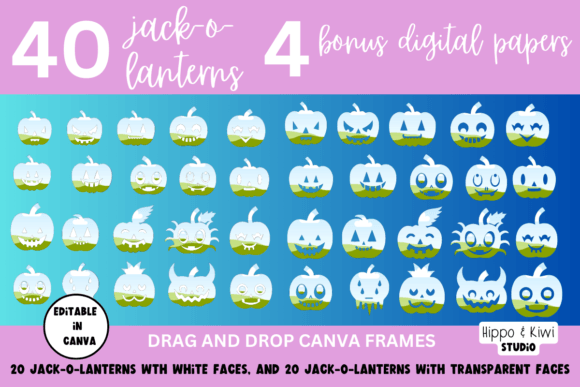
At its core, this collection of templates is about versatility and "drag-and-drop" functionality. The product includes 40 distinct pumpkin frames, ranging from classic, rounded gourds to more stylized, jagged-edged jack-o-lanterns. The visual appeal lies in the "face" of the pumpkin. Instead of a static image, the face acts as a window or a mask. This is where the modern typography and design elements come into play. You aren't just placing a picture of a pumpkin; you are using the pumpkin as a container for other media.
The style is playful yet sophisticated enough for commercial use. Because the pumpkins are vector-based frames within Canva, they maintain crisp edges whether you scale them for a massive print poster or a tiny Instagram icon. The "personality" of these assets is inherently festive and energetic. However, the way you fill the frame determines the final look. If you fill the jack-o-lantern face with a dark, gritty texture, you get a horror-style graphic. If you fill it with pastel florals, you get a whimsical, "cottage-core" autumn aesthetic. This adaptability makes the Jack-O-Lanterns Canva Frame Templates a powerhouse for brand identity work during the Q4 season.
Practical Applications Across Industries
One of the most common mistakes in seasonal marketing is relying on generic stock photos. When every coffee shop uses the same stock image of a latte with a ghost drawn in the foam, the branding gets lost. Using these frames allows you to create custom social media graphics that stand out.
Here is how different professionals can leverage these templates:
- For Marketers and Entrepreneurs: Use the transparent face option to create dynamic sale announcements. Imagine a pumpkin frame where the "face" reveals the text "50% OFF" in a bold sans serif font. This creates immediate visual hierarchy.
- For Content Creators and YouTubers: You can actually insert videos into these frames. If you are a lifestyle vlogger, you can place a clip of yourself carving a real pumpkin inside the digital frame. It adds a layer of depth to your web design and channel art that static images cannot achieve.
- For Crafters and Print Design: The inclusion of 5 bonus digital papers is a significant value-add. You can fill the pumpkin with a plaid digital paper and overlay a script font for a rustic, farmhouse-style invitation. This is perfect for packaging design for homemade treats or party favors.
- For Educators and Parents: Create "Student of the Week" awards or party invitations. The ease of use means you can create 20 unique variations in minutes, ensuring every child gets a personalized graphic.
Technical Workflow: From Template to Final Asset
While the process is designed to be intuitive, understanding the technical nuances will save you time. The product is delivered via a PDF containing a direct link to Canva. Once you click "Edit Template," a copy is saved to your account.
The most critical aspect of this workflow involves the PNG with transparent background. As noted in the product details, saving with a transparent background requires a Canva PRO account. Why does this matter? If you are placing your jack-o-lantern on a website with a dark background, a white box around the pumpkin looks amateurish. The transparent PNG allows the pumpkin to "float" on your design, integrating seamlessly with your existing web design elements.
Here is a step-by-step approach to getting the best results:
- Select Your Media: Choose a high-resolution photo or a seamless pattern. If using the bonus digital papers, ensure the scale matches the pumpkin size so the pattern isn't too busy.
- The Drag-and-Drop Method: Simply drag your image from the uploads panel directly onto the pumpkin shape. Canva’s masking feature automatically clips the image to fit the frame.
- Layering for Depth: Don't just stop at the fill. Add drop shadows or outline strokes to the pumpkin frame itself. This adds a 3D effect that makes the graphic pop on mobile screens.
- Typography Pairing: Because pumpkins are organic and round, they pair best with handwritten fonts or script fonts for a spooky vibe. For a more modern, clean look (think corporate Halloween party), pair the pumpkin with a geometric display font.
Design Strategy and Brand Consistency
When using Jack-O-Lanterns Canva Frame Templates, your goal should be consistency. A common pitfall is using too many different fills across your campaign. If your Instagram feed has a pumpkin filled with a photo, then one with a pattern, then one with a solid color, it can look chaotic.
Instead, treat these frames as part of your brand identity toolkit. Select two or three core patterns or colors to fill the pumpkins. For example, if your brand colors are black and gold, fill the pumpkins with a gold foil texture and place black text inside the face. This creates a premium, cohesive look that elevates your seasonal marketing from "crafty" to "professional."
Furthermore, consider the context of the font pairing. If you are overlaying text on top of the pumpkin (rather than inside it), ensure there is enough contrast. A busy background inside the pumpkin face can make text hard to read. Use a semi-transparent overlay or a drop shadow on your text to ensure readability, adhering to Google Helpful Content guidelines that prioritize user experience.
Maximizing the Value of Your Assets
The inclusion of a tutorial is a thoughtful touch, especially for those new to Canva’s advanced features. Even though the tutorial references butterfly frames, the mechanics of masking and layering are identical. Take 10 minutes to watch that tutorial; it will unlock the potential of the 40 pumpkin variations.
Ultimately, these templates are more than just seasonal decoration; they are a time-saving design asset. By utilizing the drag-and-drop interface and the bonus papers, you can produce weeks' worth of content in a single afternoon. Whether you are designing a newsletter header, a Facebook cover photo, or a printable party invite, the Jack-O-Lanterns Canva Frame Templates provide the structure you need to let your creativity shine—no design degree required.