Circle Frames Print Templates: Craft Perfect Earrings & Keychains
Creating consistent, professional-looking round crafts like earrings and keychains often hits a snag at the production stage. You have the design, but getting it perfectly centered and consistently sized across dozens of pieces is tedious and error-prone. This is where the Circle Frames Print Templates—2 Sizes become an indispensable part of your creative toolkit. This set of Canva templates is engineered specifically for makers and entrepreneurs who need to produce batches of circular items efficiently.
What Exactly Are These Circle Frame Templates?
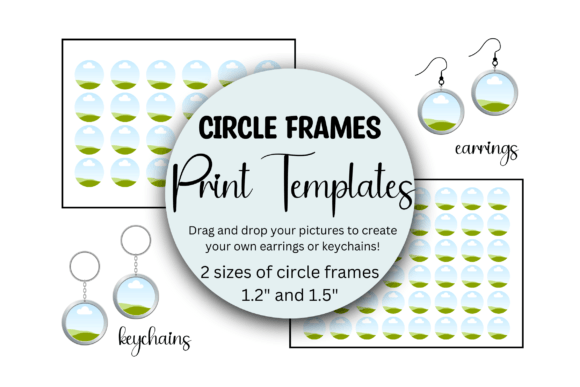
At its core, this is a pair of digital design assets designed for drag-and-drop simplicity within Canva. You receive two distinct, pre-sized templates: one optimized for printing 24 circles at 1.5 inches in diameter, and another for 48 circles at 1.2 inches, both laid out on a standard 8.5" x 11" sheet. Think of them as precision grids for your sublimation printer or home printer. The visual style is clean, utilitarian, and focused entirely on function—there's no decorative flair because the template itself is invisible in the final product; its job is to hold your artwork perfectly.
The appeal lies in its direct problem-solving nature. For a crafter, it eliminates the guesswork and repetitive manual alignment. For a small business owner, it streamlines the path from digital design to physical product, which is critical for maintaining inventory or fulfilling custom orders. The templates function as a silent, reliable production manager for your creative work.
Where These Templates Fit Into Your Creative Workflow
The applications extend far beyond just earrings and keychains, though those are the most common. Consider these scenarios where the Circle Frames Print Templates prove their value:
- Sublimation Printing: This is the primary use case. Sublimation requires precise, mirror-image printing on special transfer paper. These templates ensure your designs transfer onto rounded blanks with perfect alignment and no wasted space, which directly impacts material cost and professional finish.
- Sticker and Decal Production: For creating batches of circular stickers, labels, or decals for planners, laptops, or packaging. Consistency here is key for brand recognition.
- Craft Fair Preparation: When you need to produce a large volume of items for an event, efficiency is everything. Printing 48 or 24 designs in one go saves significant time compared to individual prints.
- Prototype Testing: Quickly test how a graphic, photo, or pattern looks at actual size before committing to a full production run on expensive blanks.
- Custom Gifts and Merchandise: Create personalized items for weddings, reunions, or team merchandise with uniform quality.
From a branding perspective, using templates like this helps maintain consistency across your product line. Every keychain and earring pair will have the same centered, professional look, which builds trust with customers and reinforces your brand identity as detail-oriented and quality-focused.
Practical Guidance for Using the Circle Frames Print Templates
Getting the most out of these templates involves a few key considerations. First, ensure your source artwork is high-resolution (300 DPI is standard for print) to avoid pixelation when printed at these smaller sizes. The drag-and-drop interface in Canva is straightforward, but take a moment to check that your image fills the frame correctly without important details being cropped near the edges.
Second, understand the material you're printing on. These templates are sized for standard letter paper, but the type of paper matters. For sublimation, you'll use sublimation paper. For stickers, you'll use sticker paper. The template itself doesn't change, but your printer settings and material choice are critical for the final result.
Third, consider your design's visual hierarchy. At 1.2 or 1.5 inches, intricate details can get lost. Bold graphics, clear typography, or striking photographs tend to work best. This isn't the place for a lengthy script font; a clean sans-serif or a simple iconic graphic will maintain readability and impact. Think of the template as a frame for your best, most concise work.
Finally, always do a test print on plain paper first. This lets you verify alignment and sizing without using up your premium materials. It's a simple step that can save you from costly mistakes. By integrating the Circle Frames Print Templates into your process, you transform a repetitive chore into a streamlined, reliable part of your creative or business operation, letting you focus more on design and less on production logistics.