50 DXF Box Templates Vol. 1: Cut Your Own Custom Packaging
Transforming Flat Sheets into Tangible Brand Assets
In the world of physical products, presentation is often the first handshake between your brand and your customer. While digital design assets like premium fonts and social media graphics build your online presence, the tactile experience of packaging solidifies brand perception. For small business owners, crafters, and entrepreneurs, finding the balance between professional packaging and cost-effectiveness is a constant challenge. This is where the utility of precision digital templates comes into play. The 50 DXF Box Templates Vol. 1 collection offers a practical solution for those looking to take control of their packaging production. Rather than relying on generic, pre-made boxes that fail to capture your specific brand identity, this collection provides the raw material for total customization.
Understanding the file format is the first step to unlocking this potential. DXF, or Drawing Exchange Format, is a universal CAD (Computer-Aided Design) file type developed by Autodesk. It is the standard language for vector design across various software platforms, making these templates highly versatile. Unlike raster images that pixelate when scaled, DXF files contain mathematical data that allows you to resize the templates without losing quality. Whether you are using a desktop cutting machine for paper crafts or a industrial laser cutter for wood or acrylic products, the precision of the DXF format ensures that your tabs, slots, and flaps align perfectly every time. This collection specifically focuses on the structural integrity of the box, stripping away unnecessary ornamentation to give you a clean slate for your own design work.
Visual Characteristics and Practical Applications
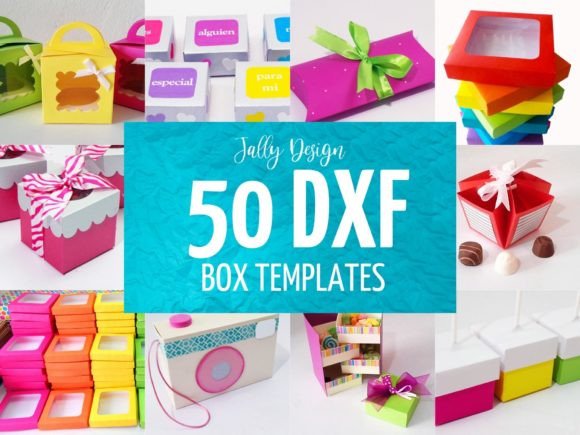
When you look at the 50 DXF Box Templates Vol. 1, you aren't looking at a finished product in the traditional sense; you are looking at blueprints. The visual appeal lies in the geometry and the potential they hold. The collection features a variety of structural styles, ranging from simple tuck-top boxes and sleeve designs to more complex pillow boxes and multi-compartment containers. The "personality" of these templates is utilitarian and precise. There is a distinct satisfaction in seeing a flat sheet of material—be it cardstock, leather, or wood—transform into a three-dimensional object through the application of these designs.
The versatility of these templates extends far beyond simple storage. For the entrepreneur, they are a gateway to packaging design that rivals big-box retailers without the minimum order quantities. Imagine a candle maker who needs a specific sized box to protect their glass jars. With this collection, they can select a template that fits perfectly, modify the dimensions if necessary, and cut the boxes on demand. For content creators and marketers, these templates are invaluable for creating "unboxing" experiences. You can use the templates to create custom mailers that reveal your product in a specific sequence, enhancing the perceived value of the item inside. Furthermore, for those in the editorial design or photography space, these boxes serve as excellent props or set pieces for product photography, adding depth and context to flat lays and lifestyle shots.
Integrating Templates into Your Brand Identity
A brand identity is more than just a logo; it is the sum of all visual and tactile interactions a customer has with your business. Using the 50 DXF Box Templates Vol. 1 allows you to weave your modern typography and graphic elements directly into the physical structure of your product presentation. Because the templates are clean and unadorned—specifically excluding decorations and embellishments—they act as a neutral canvas. This is a crucial feature for designers and brand strategists. You are not fighting against pre-printed patterns or generic designs; you are starting with a structurally sound foundation.
The influence on brand perception is significant. When a customer receives a box that has been custom-cut to fit the product, it signals care and professionalism. It eliminates the "rattle" of a product in a box that is too large, or the frustration of struggling to open a package that is too tight. This attention to detail contributes to audience engagement. To maximize this effect, consider how you will apply your graphics. Once you import the DXF file into your vector software (such as Adobe Illustrator or CorelDRAW), you can overlay your serif fonts or sans serif fonts onto the flat surface of the template. This allows you to print the box template and the graphics simultaneously, ensuring perfect alignment between the structure and the design.
Technical Guidance for Designers and Crafters
To get the most out of the 50 DXF Box Templates Vol. 1, a practical understanding of your tools is required. As noted, the file format is .dxf. Before purchasing or downloading, it is imperative to verify that your specific software or cutting machine application supports this vector format. Most professional design software and high-end cutting machines (like those from Cricut or Silhouette, particularly their professional or industrial lines) handle DXF files with ease.
When evaluating the fit of a template for your project, consider the "bleed" and the material thickness. If you are cutting these from heavy cardstock or wood, you may need to scale the design slightly to account for the material's bulk, or adjust the tolerance of the tabs and slots in your software. A key recommendation for hobbyists and publishers alike is to perform a "test cut" on scrap material. Do not waste your premium paper or expensive veneer on the first attempt. Cut the template once in plain paper to ensure the assembly is intuitive and the dimensions match your product.
Furthermore, think about how these structural designs interact with your other design assets. If you are using a script font or a handwritten font on the exterior of the box, ensure that the surface area of the chosen template is large enough to accommodate legible text. A highly decorative display font might look stunning on a large shipping box but could become illegible on a small jewelry box. By combining the structural reliability of the DXF templates with thoughtful typography and graphic placement, you create a cohesive commercial font